Read: 06 - Node, Express, and APIs Summary:
What Is Node and When Should I Use It?
- Node.js® is an event-based, non-blocking, asynchronous I/O JavaScript runtime built on Chrome’s V8 JavaScript engine and libuv library.
- The V8 engine is the open-source JavaScript engine that runs in Google Chrome and other Chromium-based web browsers, including Brave, Opera, and Vivaldi. It was designed with performance in mind and is responsible for compiling JavaScript directly to native machine code that your computer can execute.
- Version Manager: This is a program that allows you to install multiple versions of Node and switch between them at will. There are various advantages to using a version manager. For example, it negates potential permission issues when using Node with npm and lets you set a Node version on a per-project basis.
- You can check that Node is installed on your system by opening a terminal and typing node -v. If all has gone well, you should see something like v12.14.1 displayed. This is the current LTS version at the time of writing.
- Node comes bundled with a package manager called npm.
- The node_modules folder shouldn’t be checked in to version control, and can, in fact, be re-created at any time by running npm install from within the project’s root.
- In the package.json file, there are lodash listed under the dependencies field. which allow any developer anywhere to clone the project and use npm to install whatever packages it needs to run.
- In developing apps with any modern JavaScript framework (for example, React or Angular), you need a Node back end to run these frameworks.
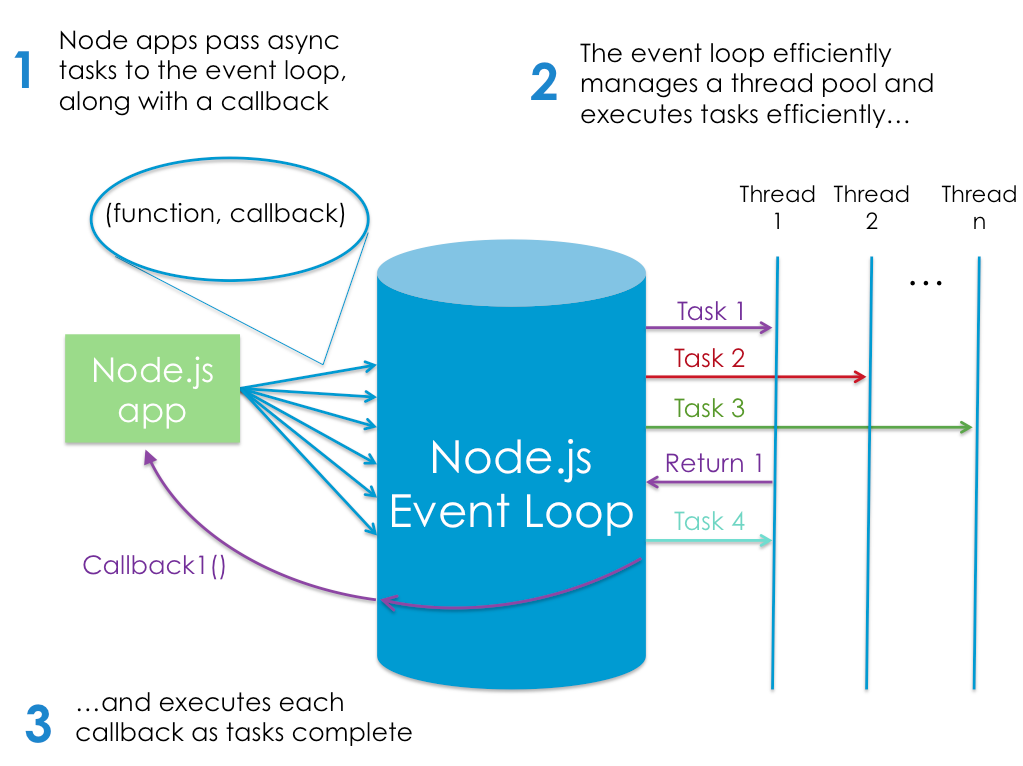
- Node.js also event-driven, which means that everything that happens in Node is in reaction to an event.
- Example : ``` const http = require(‘http’);
http.createServer((request, response) => { response.writeHead(200); response.end(‘Hello, World!’); }).listen(3000);
console.log(‘Server running on http://localhost:3000’); ```
- Notes :
- We use createServer method to create a new web server object, to which we pass an anonymous function. This function will be invoked for every new connection that’s made to the server.
- The anonymous function is called with two arguments (request and response). These contain the request from the user and the response, which we use to send back a 200 HTTP status code, along with our “Hello World!” message.
- Finally, we tell the server to listen for incoming requests on port 3000, and output a message to the terminal to let us know it’s running.
- Node is particularly suited to building applications that require some form of real-time interaction or collaboration .
- Node can be used as a scripting language to automate repetitive or error prone tasks on your PC. It can also be used to write your own command line tool, also can be used to build cross-platform desktop apps and even to create your own robots!!