Reading 06a Summary
Chapter 10 notes:
- CSS allows you to create rules that specify how the content of an element should appear.
- Block level elements look like they start on a new line. Examples include the < h1 >-< h6 >, < p > and < div > elements.
- Inline elements flow within the text and do not start on a new line. Examples include < b >, < i >, < img >, < em > and < span >.
-
CSS works by associating rules with HTML elements. These rules govern how the content of specified elements should be displayed. A CSS rule contains two parts: a selector and a declaration.
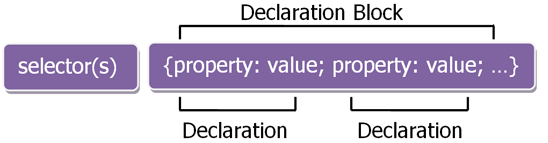
- Selectors indicate which element the rule applies to.The same rule can apply to more than one element if you separate the element names with commas.
- Declarations indicate how the elements referred to in the selector should be styled. Declarations are split into two parts (a property and a value), and are separated by a colon.You can specify several properties in one declaration, each separated by a semi-colon.
CSS rules usually appear in a separate document, although they may appear within an HTML page:
- Using External CSS by using < link > element that can be used in an HTML document to tell the browser where to find the CSS file used to style the page. It is an empty element (meaning it does not need a closing tag), and it lives inside the < head > element. It should use three attributes:
- href
- type
- rel
- Using Internal CSS by using < style > to include CSS rules within an HTML page by placing them inside a < style > element, which usually sits inside the < head > element of the page.The < style > element should use the type attribute to indicate that the styles are specified in CSS. The value should be text/css.
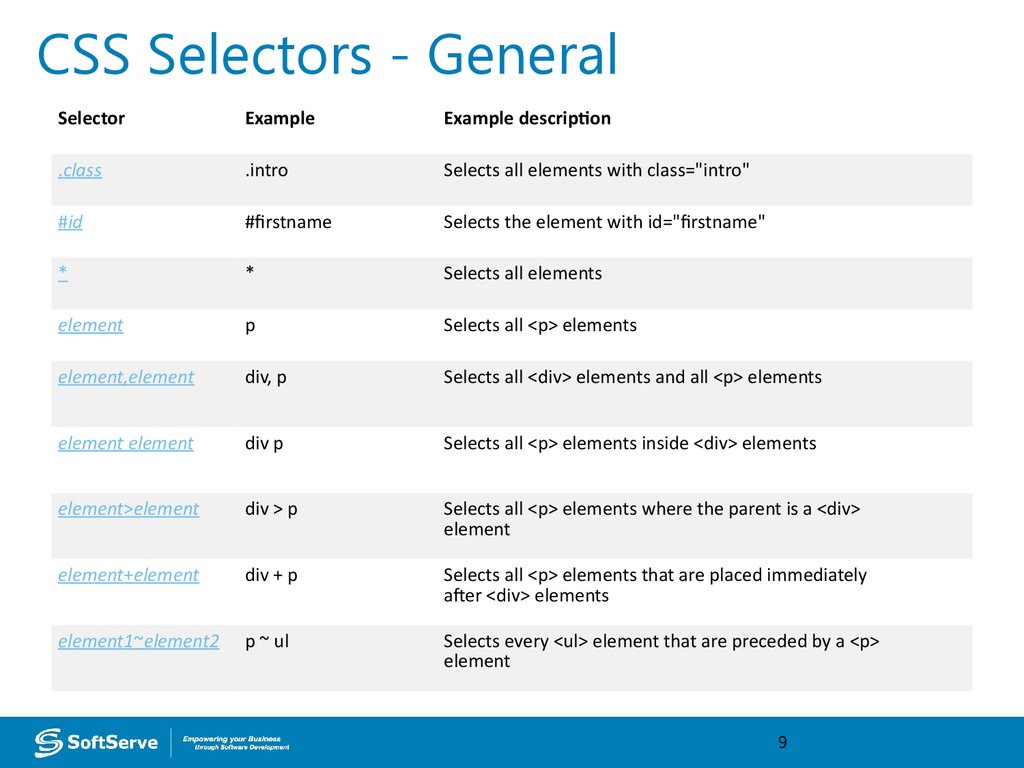
- CSS Selectors: Different types of selectors allow you to target your rules at different elements.
- When building a website there are several advantages to placing your CSS rules in a separate style sheet.
- Allows all pages to use the same style rules (rather than repeating them in each page).
- Keeps the content separate from how the page looks.
- Means you can change the styles used across all pages by altering just one file (rather than each individual page).
- If you are just creating a single page, you might decide to put the rules in the same file to keep everything in one place.
Chapter 11 notes:
- You can specify any color in CSS in one of these ways:
- rgb values : These express colors in termsof how much red, green and blue are used to make it up as a numbers between 0 and 255. . For example: rgb(100,100,90)
- hex codes : These are six-digit codes that represent the amount of red, green and blue in a color, preceded by a pound or hash # sign. For example: #ee3e80 (hexadecimal code.)
- color names :There are 147 predefined color names that are recognized by browsers. For example: DarkCyan.
- Else way using: Hue+Saturation Saturation refers to the amount of gray in a color+ Brightness refers to how much black is in a color.
- The background-color property sets the color of the background for that box which include the HTML element.
- Color pickers can help you find the color you want.
- It is important to ensure that there is enough contrast between any text and the background color (otherwise people will not be able to read your content).
- CSS3 has introduced an extra value for RGB colors to indicate opacity. It is known as RGBA.
- CSS3 allows to specify colors as HSL values, with an optional opacity value. It is known as HSLA.