Reading 03b Summary
HTML structure:
- HTML Describes the Structure of Pages.
- HTML uses tags (characters that sit inside angled brackets) to give the information they surround special meaning.Tags usually come in pairs(opening tag and closing tag ).
- Discribtion sample :

When the code begin with !DOCTYPE html the version is HTML5 2014.
Extra Markup notes:
- You can add comments to your code between the < !– and – > markers.
- The id attribute is used to specify a unique id for an HTML element.
- The class attribute specifies one or more classnames for an element.
- A block-level element always starts on a new line.
- In inline element does not start on a new line.
- The < div > and < span > elements allow to group block-level and inline elements together.
- < iframes > cut windows into your web pages through which other pages can be displayed.
- The < meta > tag allows to supply all kinds of information about your web page.
- Escape characters are used to include special characters in your pages such as <, >, and ©.
HTML5 Layout notes:
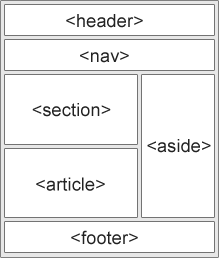
- The new elements provide clearer code (compared with using multiple < div > elements).
- Older browsers that do not understand HTML5 elements need to be told which elements are block-level elements.
- < header > - Defines a header for a document or a section
- < nav > - Defines a set of navigation links
- < section > - Defines a section in a document
- < article > - Defines an independent, self-contained content
- < aside > - Defines content aside from the content (like a sidebar)
- < footer > - Defines a footer for a document or a section
- < details > - Defines additional details that the user can open and close on demand
- < summary > - Defines a heading for the < details > element
- < figure > - to add figure(Images, Videos, Graphs, Diagrams, Code samples, Text that supports the main body of an article) inside the < article > .
- < figure > element should also contain a < figcaption > element which provides a text decription for the content of the < figure > element.
- The purpose of the < hgroup > element is to group together a set of one or more < h1 > through < h6 > elements so that they are treated as one single heading.
Process & Design notes:
- Every website should be designed for the target audience. It is very important to understand who your target audience is.why they would come to your site, what information they want to find and when they are likely to return.
- Site maps allow you to plan the structure of a site.
- To decide what information should go on each page, you can use a technique called card sorting.
- Wireframes allow you to organize the information that will need to go on each page.
- Design is about communication. Visual hierarchy helps visitors understand what you are trying to tell them.
- You can differentiate between pieces of information using size, color, and style.
- You can use grouping and similarity to help simplify the information you present.